
下载安装华为 DevEco Studio 集成开发环境(IDE)。
ohpm 是鸿蒙的三方库依赖管理工具,其中央仓库地址为 https://ohpm.openharmony.cn/ohpm,网站为 https://ohpm.openharmony.cn
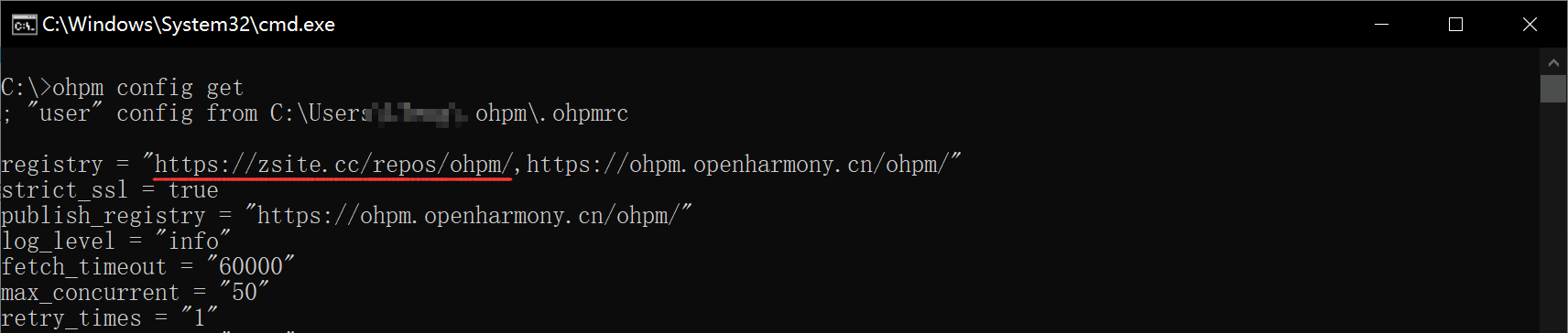
ymx 自建了 ohpm 私有仓库,地址为 https://zsite.cc/repos/ohpm/,ymx 插件及相关依赖包会发布到此仓库中。
在命令行或者 DevEco Studio 的 终端 窗口执行以下命令添加 ymx 私仓地址。
# 添加 ymx 的 https://zsite.cc/repos/ohpm/ 仓库
# 用逗号分割多个仓库地址,请确保 https://ohpm.openharmony.cn/ohpm/ 也在 registry 中,以便安装其他依赖包
ohpm config set registry https://zsite.cc/repos/ohpm/,https://ohpm.openharmony.cn/ohpm/

# 查看 ohpm 配置,确保 registry 中包含了 https://zsite.cc/repos/ohpm/
ohpm config get
DevEco Studio → 文件 → 新建 → 模块
支持 HAR 静态共享包 Static Library 和 HSP 动态共享包 Shared Library 两种类型的插件模块,任选一种即可。
Static Library 静态共享模块编译打包为 .har 文件发布到仓库;
Shared Library 动态共享模块编译打包为 .tgz 文件发布到仓库;
编辑模块的 oh-package.json5 文件,重点在于包名 name 和依赖 dependencies 字段。包名是平台全局唯一的,建议使用 @scope/name 的命名方式,scope 可以是公司或者组织的名字,name 是模块的名字。
{
  "name": "your-package-name",
  "version": "1.0.0",
  "description": "Please describe the basic information.",
  "main": "Index.ets",
  "author": "",
  "license": "Apache-2.0",
  "dependencies": {
    "@ymx/core": "^1.0.0"
  }
}
也可以在终端命令行控制台添加 @ymx/core 依赖:
# cd 到模块 oh-package.json5 所在目录
ohpm install @ymx/core
⚠️ HAR Static Library 类型插件注意:由于 App 采用 动态变量方式 import 插件模块,本地测试期间需要在 HAP 入口模块的 build-profile.json5 中配置 runtimeOnly packages 选项,云端打包已自动处理,无需关注此配置。
// HAP's build-profile.json5
{
  "buildOption": {
    "arkOptions": {
      "runtimeOnly": {
        "packages": [
          // 你的 har 插件包名
          "your-har-package-name"
        ],
      }
    }
  }
}
⚠️ HSP Shared Library 类型插件注意:需要编辑模块 build-profile.json5 文件为 集成态 HSP 模式,添加 "hspIntegration": true 字段,否则您发布的插件包将无法编译打包进 App。
{
  "apiType": "stageMode",
  "buildOptionSet": [
    {
      "arkOptions": {
        "integratedHsp": true,
      },
    },
  ]
}
简单示例代码,模块目录 src/main/ets/Index.ets
import * as ymx from "@ymx/core";

/**
 * 插件类需要继承自 ymx.Plugin 或 ymx.PluginWithConfig<TConfig>,并添加 @ymx.PluginClass() 注解。
 * 插件方法接收一个 ymx.PluginCall<TData> 参数,并添加 @ymx.PluginMethod() 注解。
 */
@ymx.PluginClass()
export class Index extends ymx.Plugin {

  /**
   * 返回当前时间
   * @param call void 类型表示不接收参数
   */
  @ymx.PluginMethod()
  now(call: ymx.PluginCall<void>) {
    const now = new Date().toLocaleString();
    call.resolve({
      now
    });
  }

  /**
   * echo 回显调用参数
   * @param call string 类型表示接收一个字符串参数
   */
  @ymx.PluginMethod()
  echo(call: ymx.PluginCall<string>) {
    call.resolve({
      hello: `hi ${call.data}`
    });
  }
}
编辑模块根目录下的 Index.ets 文件,导出插件类。注意 Index.ets 的文件名需要和 oh-package.json5 中 main 字段一致(默认就是 Index.ets)。
export { Index } from './src/main/ets/Index';
ohpm install @ymx/core# cd 到 Ability 应用 oh-package.json5 所在目录,安装本地依赖 file:插件所在目录,注意路径需要根据实际情况修改
ohpm install file:../your-plugin-module-directory
将 DevEco Studio 构建模式改为 release(调试的时候请改回 debug 模式)

选中插件模块,点击顶部菜单构建模块,构建成功即可在模块 build 目录找到 .har 或 .tgz 包。
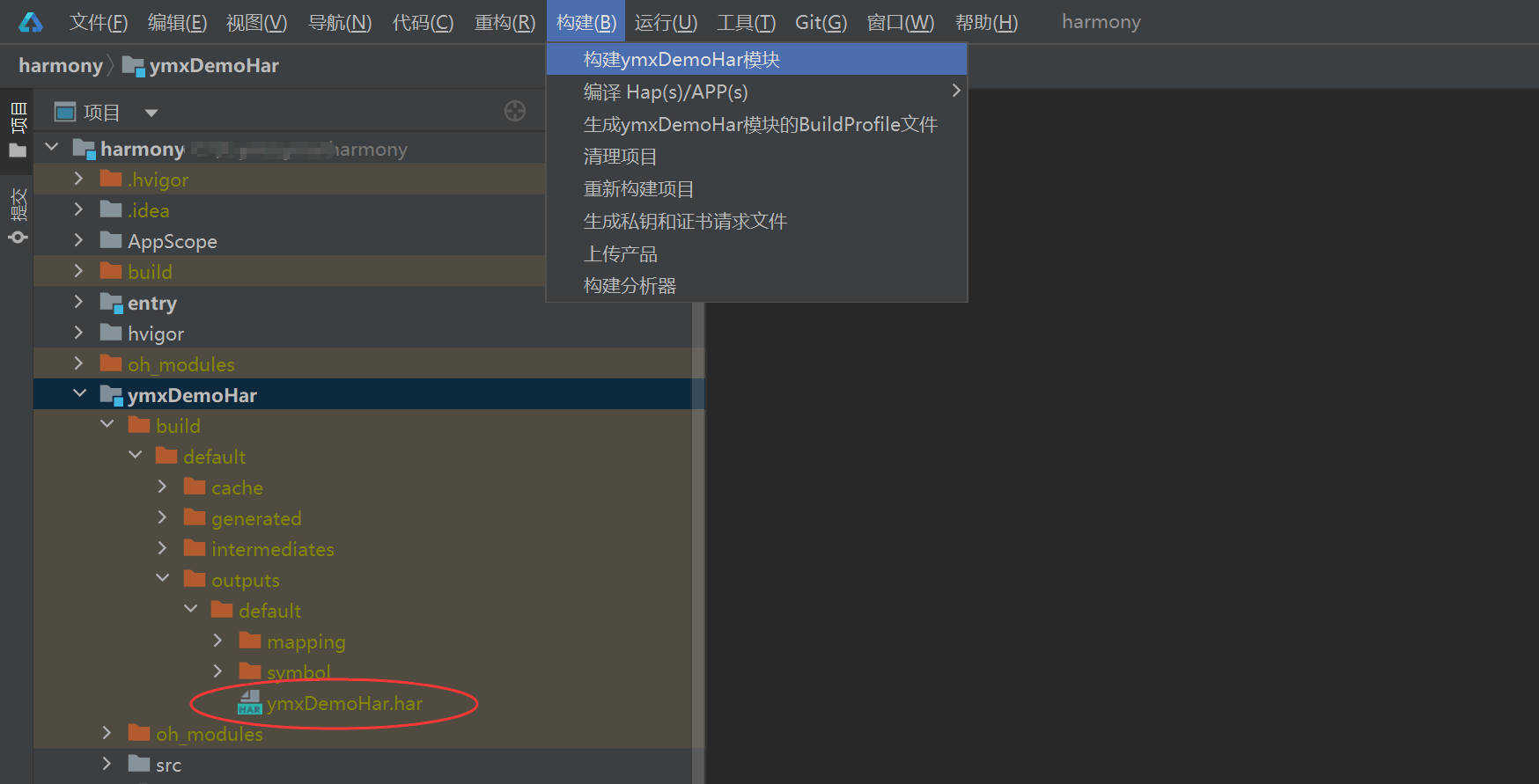
将构建好的 .har 或 .tgz 包发布到 ymx 或者 openharmony 仓库。⚠️ openharmony 中央仓库不支持上传 Shared Library 模块包,如果您的插件是 .tgz 包只能发布到 ymx 仓库。
在 ymx 后台新建插件并依赖上述插件包,插件可设置为 私有(仅自己可用)或 公开(发布到插件市场)。
在 ymx 后台新建应用,添加插件,生成 App 安装到设备上,编写 js 调用插件接口
// your-plugin-id 为你新建插件时设置的插件 ID
const myPlugin = ymx.requirePlugin('your-plugin-id');
myPlugin.echo('张三')
  .then(res => {
    alert(res.hello);
  })
  .catch(err => {
    alert(`${err.errCode}: ${err.errMsg}`);
  });